
Last Updated on August 24, 2026 by jparadiso
DMARC Monitoring: Catching Email Spoofing Before It Harms Deliverability
Monitoring DMARC reports is crucial for preventing email spoofing and protecting your sender reputation. These reports provide detailed insights into how your emails are being authenticated by recipient servers, allowing you to identify unauthorized use of your domain and take proactive steps to maintain high email deliverability. By regularly analyzing DMARC data, organizations can swiftly detect and address spoofing attempts, safeguarding brand integrity and ensuring legitimate emails reach their intended inboxes.
Why DMARC Monitoring is Essential for Email Deliverability
Email deliverability is the lifeblood of effective digital communication, directly impacting marketing campaign success and business operations. Without proper authentication, your legitimate emails risk being flagged as spam, never reaching your audience. DMARC (Domain-based Message Authentication, Reporting, and Conformance) is a critical email authentication protocol designed to protect your domain from unauthorized use, such as spoofing and phishing. It builds upon SPF (Sender Policy Framework) and DKIM (DomainKeys Identified Mail) by instructing recipient email servers on how to handle emails that fail authentication checks and providing a feedback loop to the domain owner.
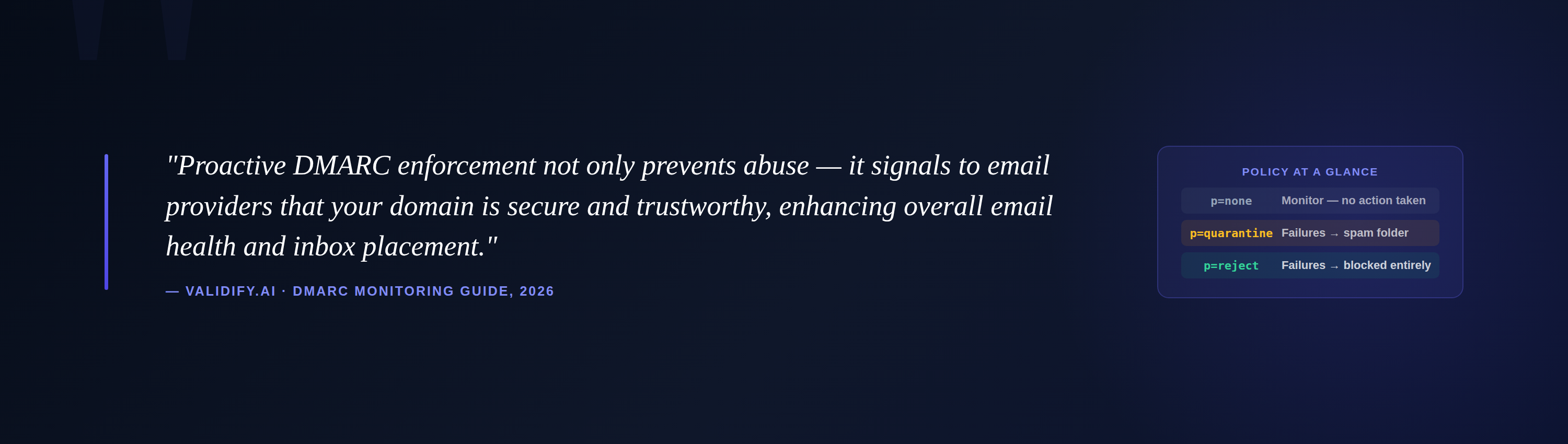
Spoofing, where an attacker sends emails appearing to originate from your domain, can severely damage your sender reputation. When your domain is spoofed, recipients may lose trust in your communications, leading to lower open rates, higher spam complaints, and ultimately, poor inbox placement for your legitimate emails. DMARC monitoring provides the visibility needed to detect these malicious activities quickly, allowing you to react before significant damage occurs to your brand and your email marketing efforts. Proactive DMARC enforcement not only prevents abuse but also signals to email providers that your domain is secure and trustworthy, enhancing overall email health.
The Mechanics of DMARC: How it Protects Your Domain
DMARC works by establishing a policy for how recipient servers should treat emails that fail SPF or DKIM authentication, and by providing a reporting mechanism. When you implement DMARC, you publish a DMARC record in your DNS. This record specifies:
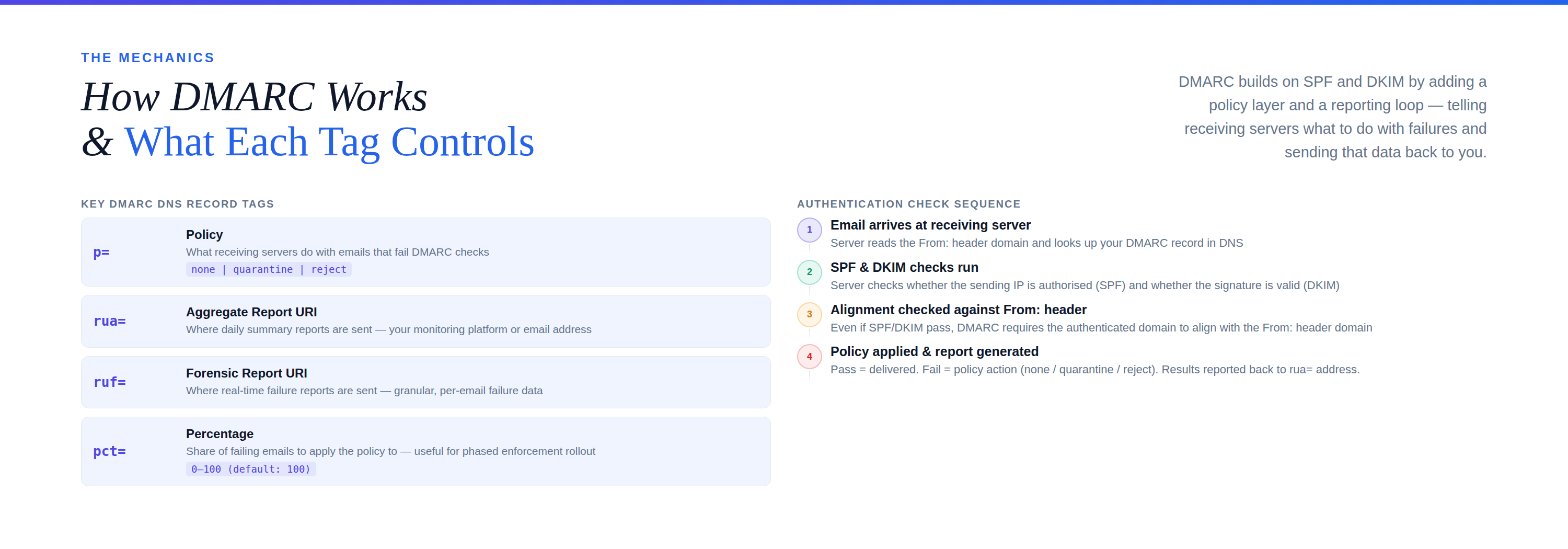
- Policy (
p=): What action to take on emails that fail DMARC authentication. Options includenone(monitor only),quarantine(send to spam/junk), orreject(block completely). - Reporting URI (
rua=,ruf=): Where to send aggregate (summary) and forensic (detailed, anonymized) reports. - Percentage (
pct=): The percentage of emails to apply the DMARC policy to (useful for phased implementation).
When an email server receives an email claiming to be from your domain, it checks your DMARC record. It then performs SPF and DKIM checks. If the email fails one or both of these and also fails DMARC alignment (meaning the From: header domain doesn’t align with the SPF or DKIM domains), the server applies the policy defined in your DMARC record. The reporting function then sends data back to you, providing invaluable insights into all email traffic claiming to originate from your domain, whether legitimate or fraudulent.
Understanding DMARC Reports: Aggregate vs. Forensic
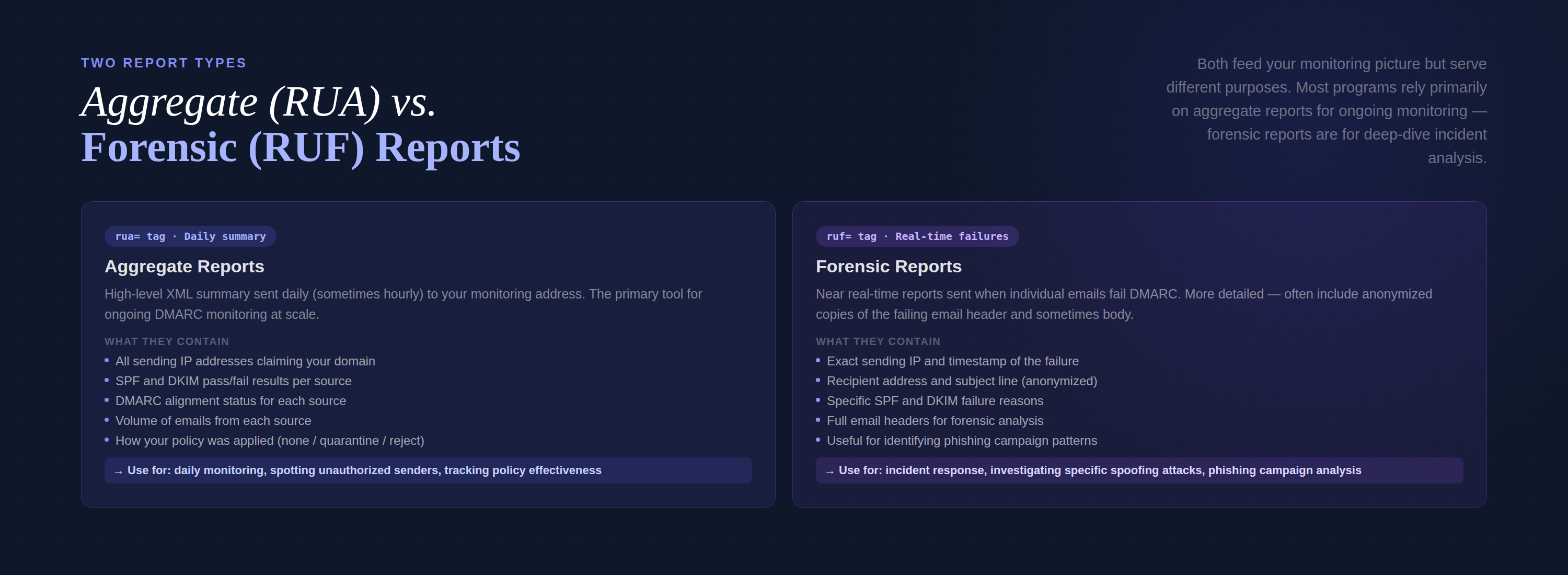
To effectively monitor DMARC, it’s crucial to understand the two main types of reports you’ll receive:
Aggregate Reports (RUA)
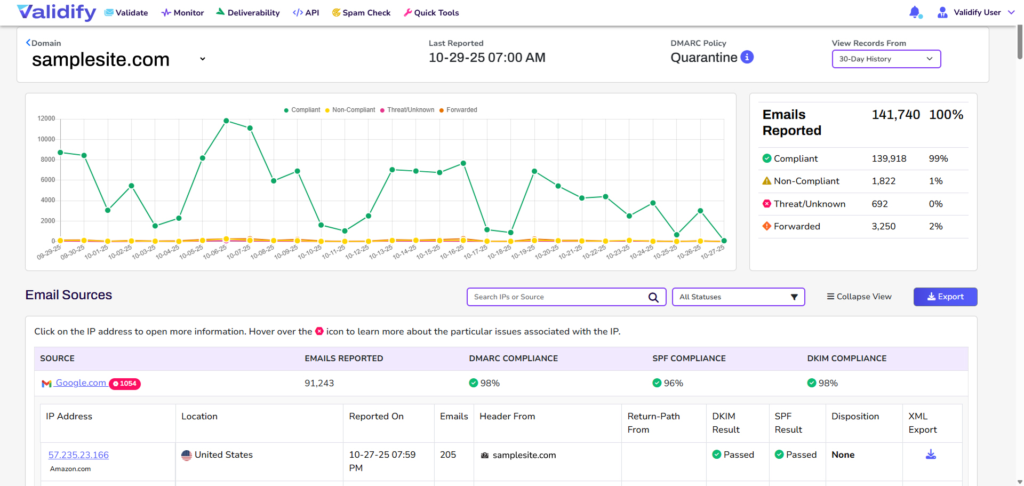
Aggregate reports provide a high-level overview of email authentication results. They are typically sent daily or hourly to the email address specified in your DMARC rua tag. These XML-formatted reports summarize the following key information:
- Sending IP addresses: Who is sending emails on behalf of your domain.
- Authentication results (SPF/DKIM): Whether emails passed or failed SPF and DKIM checks.
- DMARC alignment status: Whether the
From:header domain aligns with the SPF and DKIM authenticated domains. - Policy application: How recipient servers applied your DMARC policy (e.g.,
none,quarantine,reject). - Email volume: The total number of emails observed from each source.
Example Use Case: You notice an unexpected IP address sending a large volume of emails claiming to be from your domain, all failing SPF and DKIM. This immediately signals a potential spoofing attempt. Without DMARC monitoring, this activity would go unnoticed until it impacted your sender reputation or led to customer complaints.
Forensic Reports (RUF)
Forensic reports, also known as failure reports, are sent in real-time or near real-time when an email fails DMARC authentication. These reports are more detailed and often contain anonymized copies of the header and sometimes even the body of the failing email. While incredibly valuable for forensic analysis, they are less commonly used for day-to-day monitoring due to privacy concerns and the potential for overwhelming volume.
Example Use Case: A forensic report might reveal the exact sender IP, recipient, and subject line of a phishing email using your domain. This detailed information can be crucial for incident response teams investigating a specific attack.
Setting Up DMARC Monitoring with Validify
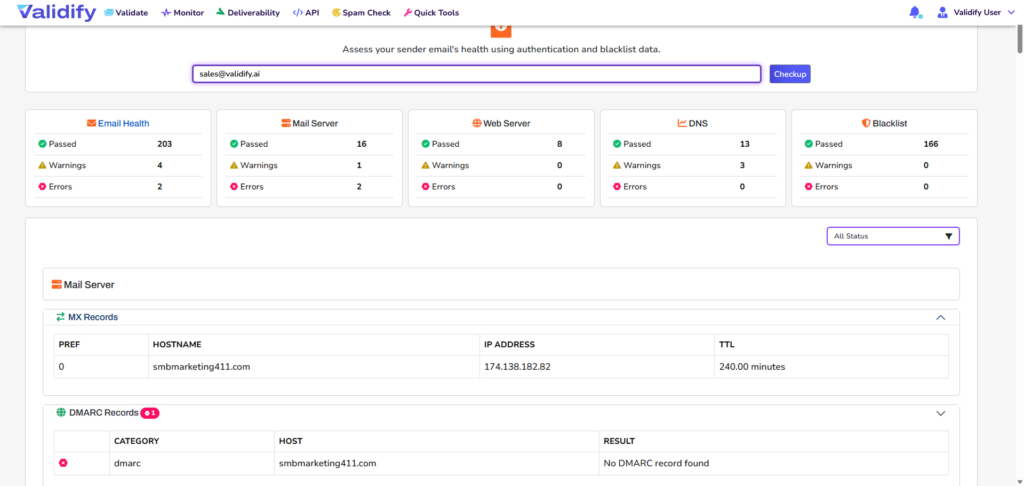
Implementing DMARC and setting up continuous monitoring can seem complex, but with the right tools, it becomes manageable. Validify provides a streamlined solution to help organizations achieve optimal email health and robust security against spoofing.
- Generate Your DMARC Record: Validify’s platform guides you through creating a DMARC record that aligns with your specific needs. Start with a
p=nonepolicy to monitor your email traffic without affecting deliverability, then gradually move toquarantineorrejectas you gain confidence. - Publish in DNS: Add the generated DMARC record to your domain’s DNS settings. This makes your policy publicly available to all recipient email servers.
- Receive and Process Reports: Your DMARC record will direct aggregate reports to Validify’s sophisticated analysis engine. Our AI-powered system automatically collects, parses, and visualizes these complex XML reports into an easily digestible format.
- Continuous Monitoring and Alerts: Validify continuously monitors incoming DMARC data, identifying anomalous email activity, potential spoofing attempts, and misconfigurations. You’ll receive real-time alerts for critical issues, allowing for immediate action.
- Actionable Insights: The platform provides clear, actionable recommendations based on report data, such as identifying legitimate sending sources that need SPF/DKIM configuration, or flagging malicious senders for investigation. This preventative approach helps maintain a high sender reputation and ensures excellent inbox placement.
Interpreting DMARC Reports: What to Look For
Once DMARC reports start flowing in, the real work of interpretation begins. Here’s what to prioritize when analyzing the data:
Identifying Unauthorized Senders
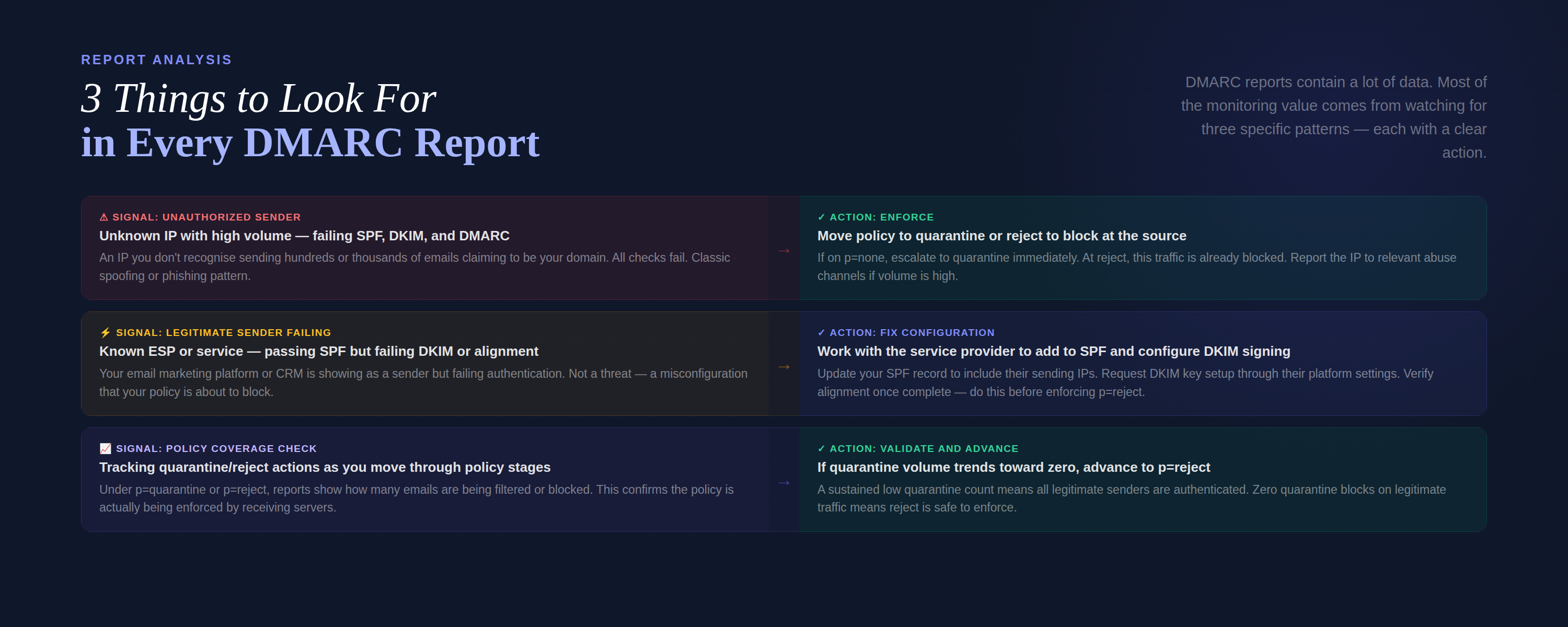
This is perhaps the most critical aspect of DMARC monitoring. Look for IP addresses or domains that are sending emails claiming to be from your domain but are not authorized. These will typically show fail results for SPF, DKIM, and DMARC alignment. Validify’s dashboards highlight these unauthorized senders, often categorizing them by volume and failure rates.
Scenario: Your report shows a high volume of emails from unknown-ip-address.com failing both SPF and DKIM. These emails are claiming to be from your domain yourcompany.com. This is a clear indicator of spoofing. Your DMARC policy, if set to quarantine or reject, would instruct receiving servers to filter or block these.
Correcting Legitimate Sending Issues
Sometimes, legitimate email senders (e.g., your email marketing platform, CRM, or transactional email service) might fail SPF or DKIM. This often means their configuration isn’t correctly set up to align with your DMARC policy. You’ll see emails from known, trusted sources failing authentication.
Action: Work with your email service providers to ensure their SPF and DKIM records are correctly configured and aligned with your domain. Validify’s reports make it easy to pinpoint exactly which legitimate senders require attention, preventing good emails from being incorrectly flagged.
Tracking Policy Effectiveness
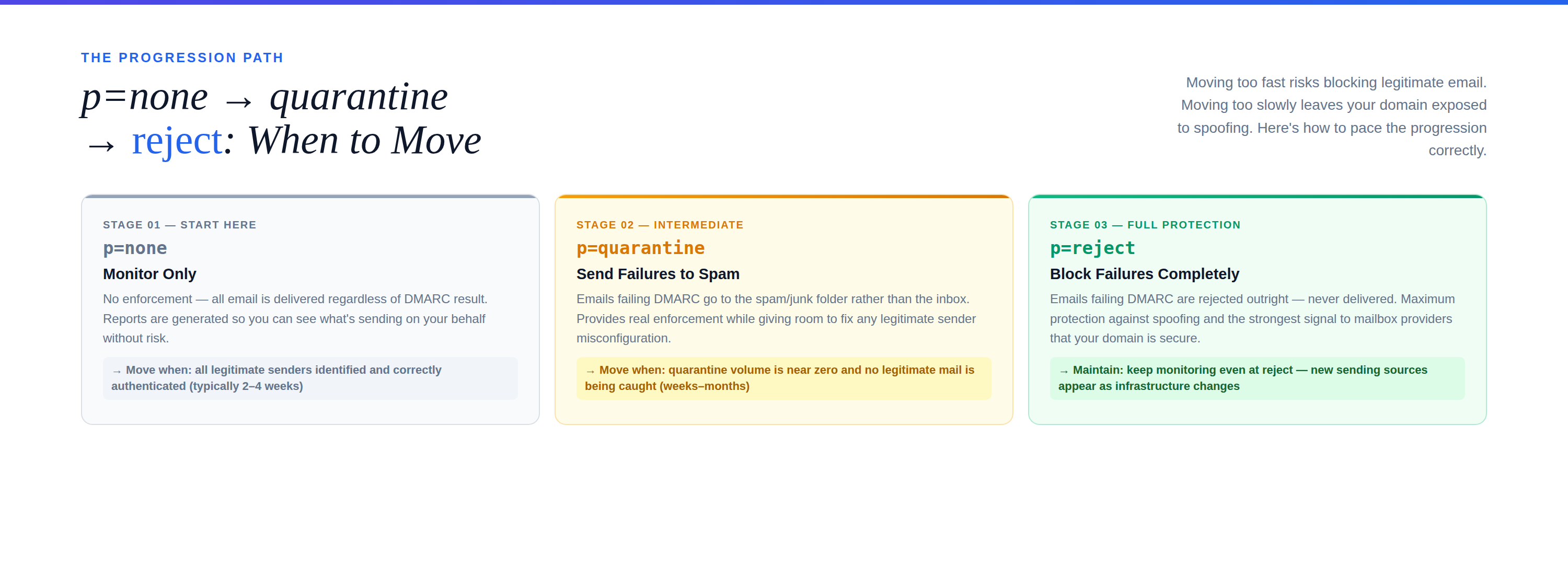
As you move from p=none to p=quarantine and eventually p=reject, DMARC reports show how recipient servers are enforcing your policy. You can see how many emails are being quarantined or rejected versus those that are still being delivered despite failing authentication (under a p=none policy).
Table: DMARC Policy Effectiveness Tracking
| Policy | Emails Received | DMARC Pass | DMARC Fail | Failed Actions (Quarantined/Rejected) |
|---|---|---|---|---|
| none | 100,000 | 99,000 | 1,000 | 0 (all delivered) |
| quarantine | 100,000 | 99,000 | 1,000 | 800 (sent to spam) |
| reject | 100,000 | 99,000 | 1,000 | 1,000 (blocked) |
This data helps you gauge the impact of your DMARC settings and assures you that your domain is being protected as intended. Moving to p=reject should only occur once you are confident that all legitimate email sources are correctly authenticated.
Advanced DMARC Monitoring Strategies
Beyond basic report analysis, several advanced strategies can further enhance your DMARC posture and email security.
Leveraging Forensic Reports for Deeper Dives
While aggregate reports offer a broad view, forensic reports provide granular details. Validify’s platform can help manage the volume of these reports and anonymize sensitive information, making them usable for incident response. Analyzing forensic reports allows you to understand the specific characteristics of spoofed emails, such as subject lines, body content patterns, and targeted recipients, which can be invaluable for identifying phishing campaigns.
Integrating with SIEM and Threat Intelligence Platforms
For larger organizations, integrating DMARC monitoring data with Security Information and Event Management (SIEM) systems or threat intelligence platforms provides a holistic view of your security landscape. This allows for correlation of email spoofing attempts with other security incidents, enabling a more comprehensive and proactive defense strategy.
Continuous Optimization and Policy Adjustment
DMARC is not a set-it-and-forget-it solution. Your email sending infrastructure evolves, and so do attacker tactics. Regularly review your DMARC reports, at least monthly, to identify new legitimate senders that need to be authenticated or new threats that emerge. Adjust your DMARC policy from p=none to p=quarantine and eventually p=reject gradually, ensuring no legitimate emails are accidentally blocked.
The Validify Advantage in DMARC Monitoring
Validify transforms complex DMARC data into clear, actionable insights. Our AI-powered DMARC monitoring solution offers:
- Automated Report Aggregation & Parsing: Eliminates the manual effort of dealing with raw XML reports.
- Intuitive Dashboards: Visualizes key metrics, sender trends, and authentication failures at a glance.
- Real-time Alerting: Notifies you immediately of suspicious activity or policy violations.
- Expert Recommendations: Provides clear steps to resolve issues and enhance your DMARC enforcement.
- Scalability: Handles large volumes of DMARC data for domains of all sizes, ensuring data quality and campaign success.
By leveraging Validify, you empower your organization to proactively defend against email spoofing, maintain a pristine sender reputation, and ensure high email deliverability. This preventative diagnostic approach is crucial for any business relying on email for communication, marketing, or transactional purposes, guaranteeing your messages land in the inbox, not the spam folder.
Ready to secure your email and boost your deliverability? Explore Validify’s DMARC monitoring solutions today and take control of your email health. Visit Validify.ai to learn more and start your journey towards impenetrable email security.
Frequently asked questions
What is DMARC monitoring and why is it important?
DMARC monitoring is the process of analyzing DMARC reports to understand how emails from your domain are being authenticated. It’s crucial because it helps identify and prevent email spoofing and phishing attacks, protecting your brand’s reputation and ensuring your legitimate emails consistently reach recipients’ inboxes without being marked as spam or rejected.
What information do DMARC reports provide?
DMARC reports provide detailed insights into email traffic originating from your domain. Aggregate reports summarize sender IP addresses, SPF/DKIM authentication results, DMARC alignment status, and policy actions taken by recipient servers. Forensic reports, though less common, offer granular, anonymized details about specific emails that failed authentication, aiding in incident response.
How can DMARC reports help catch spoofing?
DMARC reports help catch spoofing by highlighting emails that claim to be from your domain but fail SPF and DKIM authentication, and DMARC alignment. These failures often indicate unauthorized senders. By analyzing these reports, you can identify suspicious IP addresses and domains, allowing you to take action like enforcing a quarantine or reject policy to block fraudulent emails.
What is the difference between aggregate and forensic DMARC reports?
Aggregate reports (RUA) provide a summary of authentication results for all emails, sent periodically (e.g., daily). They are high-level and volume-based. Forensic reports (RUF) offer detailed, anonymized information about individual emails that failed DMARC, often sent in real-time. Aggregate reports are for overview; forensic reports for in-depth analysis of specific failures.
How does Validify simplify DMARC monitoring?
Validify simplifies DMARC monitoring by automating the collection and parsing of complex XML reports into intuitive, actionable dashboards. It provides real-time alerts for suspicious activity, identifies legitimate senders needing configuration, and offers expert recommendations to resolve issues. This AI-powered solution ensures continuous protection against spoofing, maintaining sender reputation and high email deliverability.
When should I move my DMARC policy from ‘none’ to ‘reject’?
You should transition your DMARC policy from ‘p=none’ (monitoring only) to ‘p=reject’ gradually. First, move to ‘p=quarantine’ after you’re confident all legitimate email sources are correctly authenticated and aligned. Only set to ‘p=reject’ when you are certain no legitimate emails will be accidentally blocked, typically after several weeks or months of careful monitoring and adjustments based on report analysis.