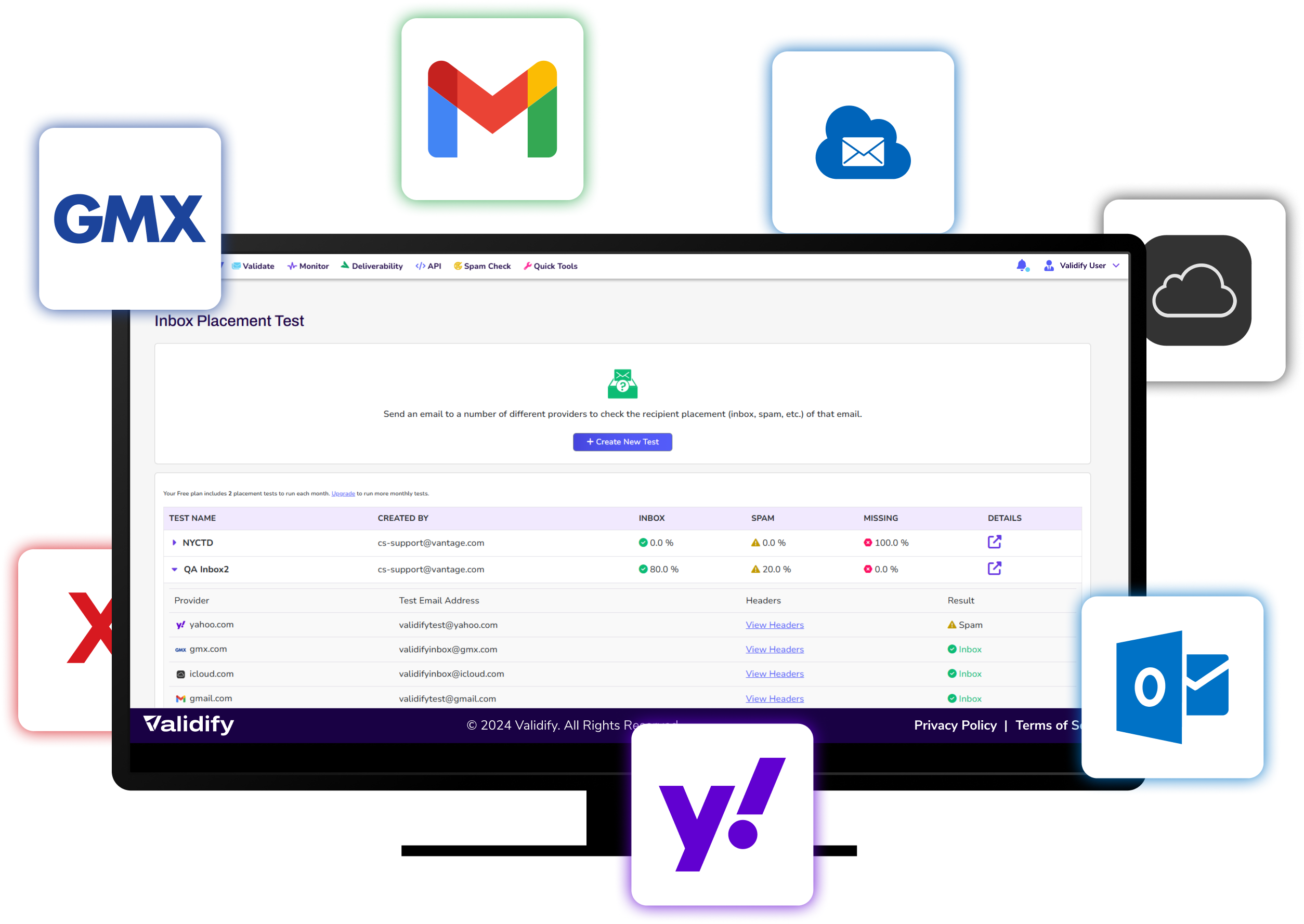
Inbox Placement Test

Inbox Placement Test: Know Exactly Where Your Emails Land

An inbox placement test shows where your email actually arrives — the inbox, the Promotions tab or the spam folder — before you send it to real subscribers. Validify delivers your exact message to a seed list across Gmail, Outlook, Yahoo, iCloud and GMX, then reports placement by provider within minutes.—so you can pinpoint issues and boost deliverability.

Email placement testing deterines if you emails land in spam or inbox

Delivered Is Not the Same as Delivered to the Inbox

Your email service provider reports delivery. It does not report placement. A message routed to Promotions or filtered to spam is counted as delivered, and almost nobody sees it.

The gap is larger than most senders expect. Take a 50,000-address campaign at a 98% delivery rate: 49,000 messages are delivered. At 79% inbox placement, 38,710 of them reach the inbox. The other 10,290 are sitting in Promotions and spam, recorded as a success in your sending report.

Test real world delivery to email servers such as gmail, outlook, yahoo, icloud, gmx

See Results Before You Send

Send the campaign and you find out from your open rate, a week late, that something went wrong. Run a placement test first and you find out in minutes, while the send is still a draft.

Validify delivers the exact message you intend to send — same subject line, same HTML, same sending domain and IP — to seed addresses at each major provider. Nothing is simulated, so what the report shows is what your subscribers would have received.

What You’ll Learn:

Placements insight, inbox, promotions and spam placement

Placement Across Inbox, and Spam

A breakdown of where your message landed for every seed address: primary inbox, Promotions or Updates tab, or spam. Tab placement is reported separately from spam, because they are different problems with different fixes.

monitor placement over time

Results by Provider: Gmail, Outlook, Yahoo

Placement is reported per provider, not as a single average. A campaign can sit at 95% in Outlook and 40% in Gmail, and the average of those two tells you nothing useful. Provider-level results tell you which filter you are failing and where to start.

Image showing the tracking of an email from beginning to destination

The Deliverability Signals Behind the Result

Each test reports the authentication and reputation signals recorded at delivery — SPF, DKIM and DMARC alignment, the sending IP and domain, and any blacklist listings found at the time of the test. Placement tells you what happened; these tell you why.

With clear visibility into where your emails land, you can take intelligent steps to improve your deliverability strategy.

STEP 1

Launch an Inbox Placement Test in Validify

Log in (or start the free trial) and navigate to Inbox Placement Test from the deliverability tools area.  Have your email ready to submit as you plan to send it.  


STEP 2

Submit the exact email you plan to send

Use the tool to run the test email through Validify’s placement process, which simulates real-world delivery by sending your message to a diverse network of seed addresses across global mailbox providers.

STEP 3

Review placement by provider, then iterate

Within minutes, review results showing where you landed (Inbox / Promotions / Spam) and the provider breakdown (e.g., Gmail, Outlook, Yahoo, iCloud, GMX). Make your adjustments and re-test; use trend tracking to monitor placement over time.

Common Inbox Placement Questions

A delivery report tells you a provider accepted your message. An inbox placement test tells you where it was filed once accepted — primary inbox, Promotions, or spam. A message can be 100% delivered and still reach almost nobody, which is the gap placement testing measures.

Validify gives you a seed list of real addresses across the major providers. You add them to your campaign and send the message exactly as it will go out. Validify checks where each copy landed and reports placement by provider, usually within minutes.

Gmail, Outlook, Yahoo, iCloud and GMX, reported separately rather than averaged. Provider-level results matter because filters differ: it is common to see strong placement at one provider and poor placement at another from the same send.

As a working benchmark, 80% or better to the primary inbox is healthy for most commercial senders. 70% to 80% is worth investigating. Below 70% generally indicates an authentication, reputation or content problem rather than a list-quality one.


Deliverability is whether a provider accepts your message. Inbox placement is where it puts it afterwards. Deliverability is the gate; placement is the room you end up in. Most sending reports measure the first and say nothing about the second.


Filtering is judged on the sender, not the list. Missing or misaligned SPF, DKIM and DMARC, a sending domain or IP with poor reputation, promotional content patterns, and low engagement from previous sends will each push mail out of the primary inbox regardless of list hygiene.

Before any significant send, and after any change to how you send: a new domain or IP, a template rebuild, a list import, or a change of email platform. Run one as a baseline first, so later results have something to be compared against.


Start with the weakest provider rather than the average. Check authentication first, because it is binary and fastest to fix; then blacklist listings; then content and sending patterns. Re-test after each change so you know which one moved the number.


A clean list does not guarantee inbox placement. Filtering decisions are made on the sender, not the recipient, and the four most common causes are:

Authentication
SPF, DKIM or DMARC missing or misaligned, which Gmail and Yahoo now treat as a bulk-sender requirement rather than a recommendation. DMARC monitoring shows what is failing and why.


Reputation
The sending domain or IP has a history filters do not like, or is listed somewhere. Blacklist monitoring catches a listing before a campaign does, and an email health check covers the rest of the sender profile.


Content and structure
Image-to-text ratio, link domains that do not match the sending domain, or a subject line that pattern-matches promotional mail. A content spam check scores a message before it goes out.


Engagement
Low opens and clicks from the recipients a provider has already seen, which pushes later messages to Promotions regardless of content. Email list validation removes the addresses that never engage because they are not real.